
There's a small but very real moment that happens to a lot of people now.
You open your eyes, pick up your phone, and before you've even had water, your thumb is already inside your inbox. A bit of scrolling, a few swipes, a mental note to "deal with that later." Then laptop. Same inbox, different view, slightly different state of mind. Maybe a tablet at night. Then back to the phone.
The tools we use have quietly turned the workday into something Microsoft now calls the "infinite workday": a stream of emails, pings, and notifications that starts before breakfast and often doesn't stop until sleep. Work Trend Index reports have tracked this shift for years, showing after-hours work climbing steadily and spanning time zones.
Harvard Business Review has been pointing to the same pattern for years: the average professional spends about 28% of the workday dealing with email — roughly 2.5 hours every single day.This is the backdrop for Filo.
From the very beginning, Filo was built around a simple idea: your inbox should help you finish things, not multiply them. That means turning important messages into clear, trackable work and quietly pushing everything else out of the way.
The experience has to feel the same wherever you open it.
That's why this update is a bigger milestone than it might look at first glance: Filo now runs on iOS, Android, macOS and Windows. One product, one way of working, all your devices.
If you want to try it in your own inbox, you can install Filo on macOS or Windows, or grab it on mobile from the App Store and Google Play.
Email hasn't become lighter. Our days have just become longer.
Industry reports keep repeating the same storyline with slightly different numbers.
A 2025 benchmark analysis puts the average professional at around 120 emails a day, with email taking up close to a third of the workweek by the time you add reading, searching, replying, and re-reading.
The reaction from most people isn't "I need more productivity hacks." It's quieter and more honest:

That's the real problem Filo is trying to address. Not "inbox zero as a lifestyle," but basic predictability. When something important arrives, you shouldn't have to babysit it across three devices and two mental models.
You should be able to see it once, understand what it means, and decide what to do with it.
One vocabulary for your inbox, whichever screen you're on
The most important thing about Filo going fully cross-platform is not that there are now four downloads instead of two. It's that the product behaves the same way in all four places.
On your phone — iOS or Android — Filo is focused on that first read of the day. Long threads are condensed into short, readable summaries so you can see what changed since you last looked. Instead of scrolling through everything, you get a crisp snapshot of what matters.
On macOS and Windows, Filo becomes more of a command center. You get the same view of your inbox, but you see it through the lens of "what needs to happen next" rather than "what arrived most recently."
There isn't a separate mental model of "how email works on my work PC" versus "how email works on my personal laptop." It's just Filo.
This might sound like a small design detail, but real people feel it as a form of relief. Recent research on information overload and decision support has repeatedly found that the biggest gains don't come from faster tools — they come from fewer context switches.
That's the spirit this release is trying to capture: fewer micro-decisions, more continuity.
What Filo actually does for you, behind the scenes
Underneath the cross-platform news, Filo is still doing a few core jobs that matter more than the logo on the dock.

First, it shrinks conversations down to size. Long, messy threads are turned into short narratives that answer two basic questions: "What's going on?" and "What's expected of me?" This is the kind of background processing that used to require reading everything line by line.
Second, it treats emails as work, not just messages. Any mail that clearly contains something you need to do can become a task, with a due date and status, instead of a vague promise to remember it later.
Third, it pushes noise to the edge. Reports like Microsoft's Work Trend Index and separate analyses from Forbes and others have started naming "email fatigue" as a real driver of burnout and attrition. Filo's approach is simple: things you don't need to see right now shouldn't dominate your view.
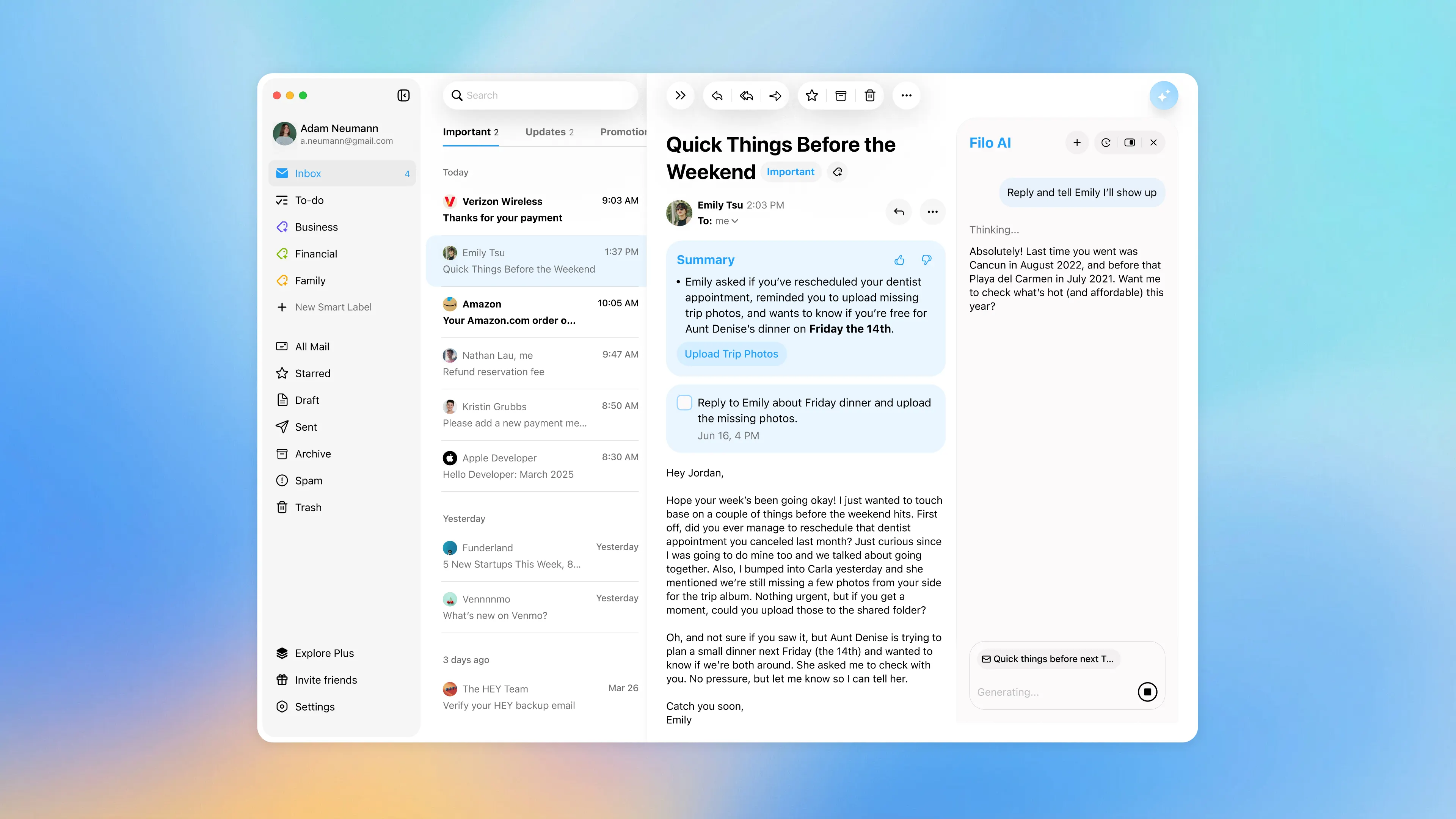
All of this is done with Gmail at the core and a very simple rule about trust: your inbox isn't turned into training data for a dozen unrelated systems.
Why being everywhere actually matters
If you step back from the product for a moment and look at the broader picture, the case for a cross-platform inbox is surprisingly straightforward:
- The sheer volume of email is still going up year after year. Recent estimates suggest more than 376 billion emails are sent every day worldwide, on track to pass 400 billion in just a couple of years.
- Most professionals now straddle multiple devices across their day, especially in remote and hybrid setups.
- The cost of a missed message is often much higher than the cost of a few extra notifications.
The old way of dealing with this — different apps, different filters, different habits on each device — used to be tolerable when workdays were shorter and inboxes were lighter. In the reality described by today's workplace research, that fragmented approach just adds more cognitive overhead to an already stretched day.
Filo going truly cross-platform is one small but concrete way to push in the opposite direction. It doesn't try to change how many emails the world sends. It just gives you one vocabulary, one workflow, one source of truth — no matter which screen happens to be in front of you.
When your day already feels like it's stretching at the seams, that kind of consistency is worth more than another feature toggle.
Where to go from here
If you're already using Filo on one device, this is a good moment to close the gap. Add it to the other screens you use every day and see what it feels like when your inbox behaves the same way everywhere.
If you're completely new, don't overthink it. Install Filo wherever you normally read email and just live with it for a week. Let it condense your busy threads, turn important messages into a small list of real tasks, and quietly filter out the noise.
Does it feel any less chaotic?
If the honest answer is yes, then you've probably just found your new default home for email.
Growth Lead at FiloMail


